Certificates
Certificates is the inventory of certificate versions known to the deployment. PORTAVIUM issues certificates automatically for the host names in an applied revision; you can also import a certificate you obtained elsewhere.
Automatic issuance
When an applied revision contains a host name without a covering certificate, the control plane continues on its own:
- DNS preflight for every blocked name — the authoritative answer and a public recursive answer are compared with the node's published addresses.
- HTTP-01 order through the product's ACME client, with a scoped challenge route that is verified on the data plane before the CA is asked to validate.
- Install of the certificate; the private key is stored encrypted.
- Activation — the live revision is re-applied and the name starts serving HTTPS.
The audit trail records AUTO_ISSUE_STARTED, AUTO_ISSUE_SUCCEEDED,
AUTO_ISSUE_FAILED or AUTO_ISSUE_DEFERRED, and AUTO_ACTIVATED. If DNS does not
contain both published addresses, issuance is deferred and retried; publishing the
records is the only action required.
DNS rules that decide whether issuance can work
- Publish both
AandAAAAwhen the node publishes IPv6. A stale or wrongAAAAis worse than none: the CA prefers IPv6 and does not fall back for every failure. - Use a short TTL (60 s) while bringing a name up.
- A name that resolves to another proxy, or to only one family, fails the preflight and no order is opened.
- Port 80 must reach the node; a proxy in front of the node breaks HTTP-01.
Renewal
After the first activation the lifecycle is automatic:
- Renewal happens when a third of the certificate's own lifetime remains, but never later than 30 days before expiry.
- One worker claims an order atomically; a restart cannot open a duplicate order.
- A renewed version is written next to the previous one, the live revision is re-applied, and the version is marked active only after the served leaf fingerprint matches on every measured family.
- Failures keep the previous still-valid certificate serving, appear on this page and in the node status endpoint, and are retried with bounded backoff (1 minute to 1 hour).
Reading the inventory
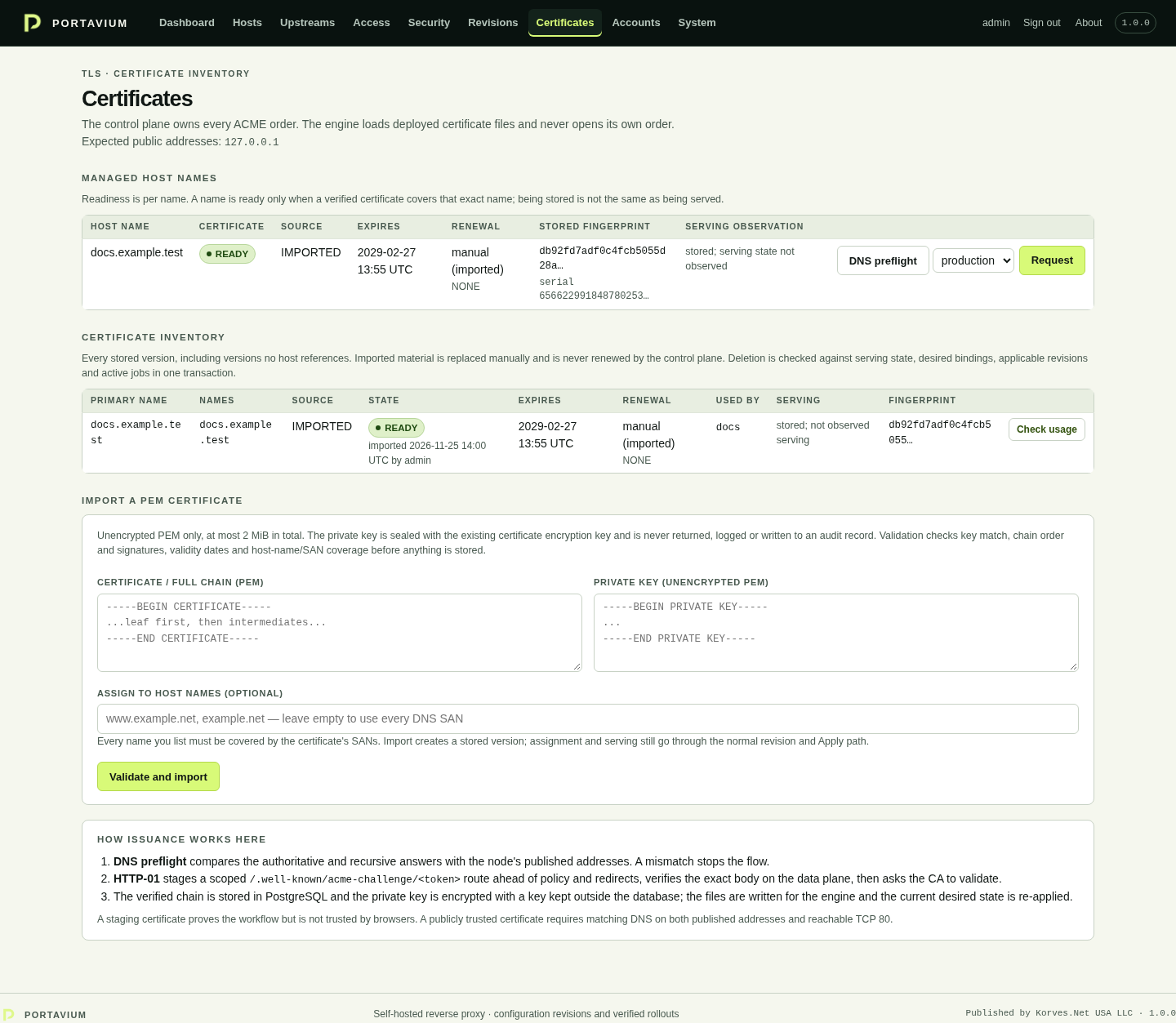
| Column | Meaning |
|---|---|
| State | PENDING → ISSUING → READY, or FAILED with the reason |
| Expires | The certificate's notAfter |
| Renewal | SCHEDULED, ISSUING, FAILED (with the next attempt) or SUPERSEDED (kept for rollback) |
| Stored fingerprint | The version stored in the database and on disk |
| Served fingerprint | The leaf the node was observed presenting on the measured families. Empty means "not observed", not "wrong". |
Stored and served are deliberately different columns: a certificate can be stored and not yet activated, and the page must not imply otherwise.
Importing a certificate
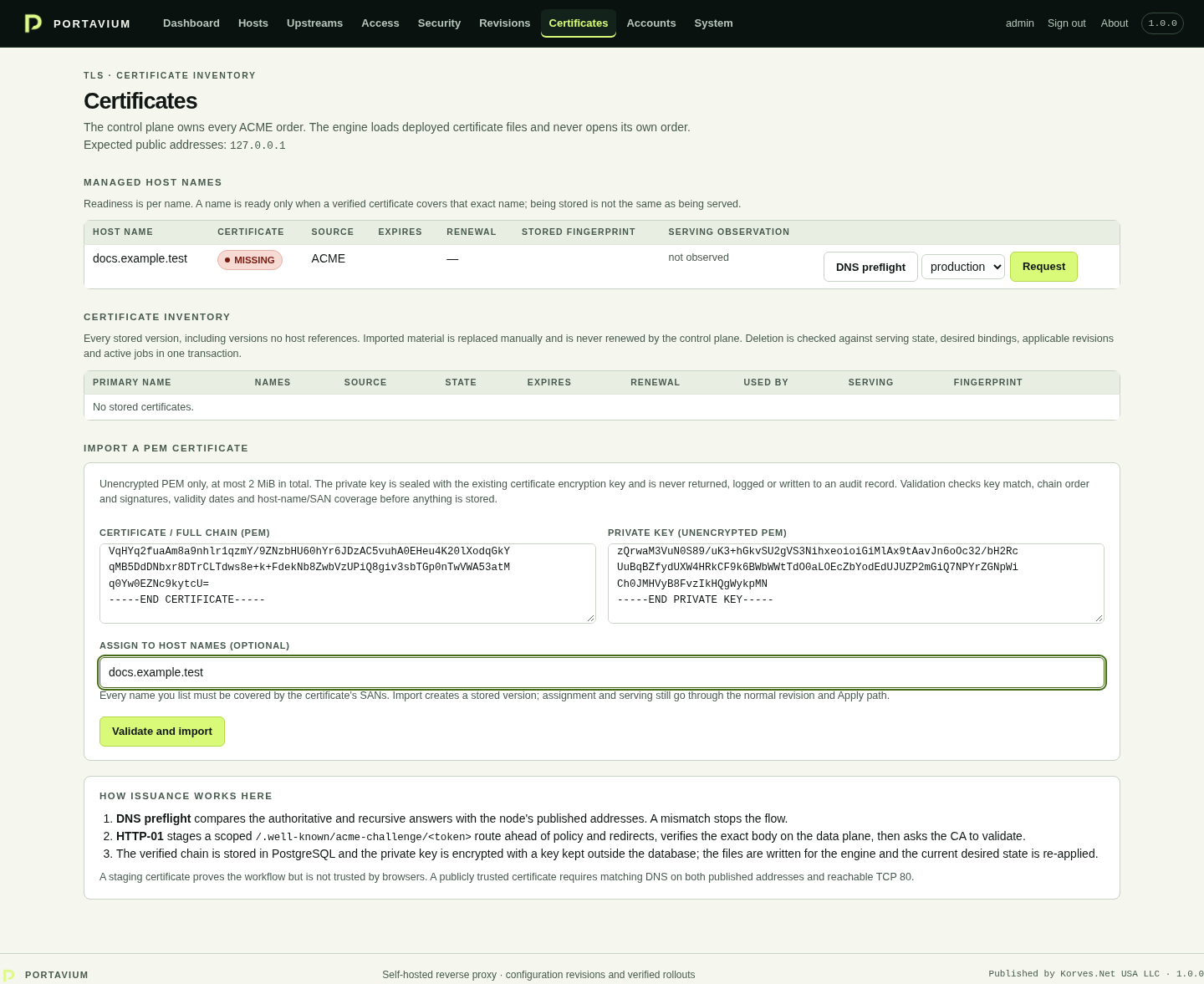
Use Certificates → Import for a purchased certificate, an internal CA or a wildcard you cannot validate over HTTP.
All of these are checked before anything is stored:
- a PEM chain (leaf first, then intermediates) and the unencrypted PEM private key;
- the key matches the certificate;
- the chain is in order and the leaf is currently valid;
- the host names you assign are covered by the certificate's SANs;
- the upload is at most 2 MiB.
An imported version has source Imported, with the administrator and time. It is not serving until you assign it and apply a revision. Imported certificates are replaced manually; they never enter ACME renewal. The private key is only held in the encrypted certificate store — never returned by an API, never written to the audit record, never logged.
Deleting a certificate version
Deletion is refused, with the reasons listed, when any of these is true:
- a host still uses one of its names;
- it belongs to the live route set and its measured serving state is unknown or different;
- the newest saved revision or a waiting/paused/review-required deferral needs it;
- an issuance or renewal job is using it.
Deleting an inventory version is not revocation at the CA. Revoke separately if a key is compromised.